Software updates

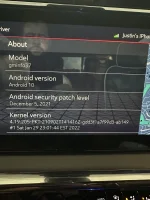
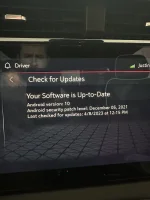
Here are my versions

IMG_0401.webp
IMG_0402.webp
IMG_0403.webp
 

Here is mine. I’m not sure why it won’t give me the latest update after I have checked multiple times. This is so frustrating.
 

Attachments

  • A0579907-AF35-480C-8A8B-172D214892E7.webp
    A0579907-AF35-480C-8A8B-172D214892E7.webp
    137.1 KB · Views: 133
  • A8536096-6FA5-4299-9ACA-D774E8B70F3A.webp
    A8536096-6FA5-4299-9ACA-D774E8B70F3A.webp
    104.3 KB · Views: 120
Thanks. I have a year older software version than you... It's weird because the truck was built in May of last year but my software version is Oct of 2021. Kernal version is different too. I just had it at dealership getting updates but this didn't change.
 

Thanks. I have a year older software version than you... It's weird because the truck was built in May of last year but my software version is Oct of 2021. Kernal version is different too. I just had it at dealership getting updates but this didn't change.
Well what are they updating? I think only the radio updates will update the version you see on the screen.
 

They were focused on the instrument panel and bcm. I told them to make sure everything was up to date but I'm guessing they didn't mess with the radio. I remember when I first bought the truck, an ota update came through but that was it. The radio has never updated.
 

A Thank you, to all earlier posts.

The GMC Bulletin adding the “AT4X” Logo Software Update, the Start Up Screen is…

22-NA-253


I called GMC Executive Resolution Team…. They confirmed what was posted earlier, gave me the exact and same bulletin update: 22-NA-253


The picture below was posted earlier in this thread, and is the CORRECT software update.

https://www.at4forum.com/attachments/f69d9a94-1338-46bb-880f-20d390ac02b4-jpeg.3463/
1682035486863.png


Take this information to your local dealer’s, service department and within 1 hours time, your Start Up display will show “AT4X” instead of “AT4”

(My truck was manufactured in July 2022)

 

Last edited:
My 23 AT4X got an OTA update today. Didn't take the time to see if anything changed, but I still have my AT4X startup screen. Took about 5 minutes to install. Wish they had a screen after the install that told what was changed with thhe update.
 

A Thank you, to all earlier posts.

The GMC Bulletin adding the “AT4X” Logo Software Update, the Start Up Screen is…

22-NA-253


I called GMC Executive Resolution Team…. They confirmed what was posted earlier, gave me the exact and same bulletin update: 22-NA-253


The picture below was posted earlier in this thread, and is the CORRECT software update.

https://www.at4forum.com/attachments/f69d9a94-1338-46bb-880f-20d390ac02b4-jpeg.3463/View attachment 3630

Take this information to your local dealer’s, service department and within 1 hours time, your Start Up display will show “AT4X” instead of “AT4”

(My truck was manufactured in July 2022)
I appreciate the confirmation and I wish it was this simple . My dealer (who originally provided the docs and bulletin # in that image) still couldn’t get the start up screen correct even after applying the update . There is a deeper step about finding the appropriate images somehow .

I have noticed some irregularities since then too
- windshield wiper will run on startup
- locker buttons will flash on startup
- sometimes parking sensors wont work


I am going to show them this thread and give them another shot at it. I know they are trying and since I bought the truck there they should feel obligated to get it right (being that an AT4X is $10k more).
 

Thanks folks, I will take this to the dealership. I got that 5 min update yesterday- it did not put the x on startup. I too have some odd stuff now. Mostly- if parking brake is set, when I open the door all screens are dark- except park is lit up until displays wake up.
 

Fox GMC of Grand Rapids
1 616-965-1785
Do you mind providing the last 6 of your VIN#? I called the dealer and spoke to the Service Manager but he couldn't find what was done. Currently my truck got "bricked" during the update so any info you could provide would be very helpful!
 

All these updates, I have not cranked my truck in two weeks, Maybe I should go crank it this weekend and actually drive it to see if I have updates pending.
 

Thanks Rocky...here is the full bulletin for anyone's reference. If you take your truck into a dealer to do the the update make sure they know what they are doing. Apparently it is easy to mess these trucks up.
Dam I better be careful with my dealer they forgot to put my oil dipstick back
 

Back
Top