New and simple Bose bypass with full Signal Sound

Had it back at the shop. They tried multiple pac's. All the same. This is an issue with something with this configuration of head unit. The Bose amp works well but installing a PAC produces a loud tone on startup. PAC support was useless in troubleshooting. They said PAC was working fine. I'm unsure if the sound is coming from the head unit, nobody has the tools to troubleshoot what the vehicle is sending to the pac. This tone doesn't sound anything like a vehicle sound, but it may be something the car is sending and if so, why? A function of the body control module? OnStar?

If anyone knows anyone at GM who may be able to troubleshoot the GM CAN and audio system, a reference would be greatly appreciated.

My next step is to try a zen nav TV interface for the truck. The shop has one ordered for me. Once that arrives I'll see if another vendor works the same. And if so, maybe their support will be better.

Last resort will be a delay start amplifier circuit. If this tone can't be defeated, since it's only on wakeup, I could build a delay circuit on the amplifier power sense line that powers on the amplifier. I think roughly a 5 second delay between when the dsp sends power on to the amp would be enough time for the tone to play before I turned the amp on, which would effectively mute it. This is my last resort though, I really want the DSP to be able to circumvent.
DIf you try the Zen nav TV interface? Or were you able to find another solution?
Thanks
 

I've added a DSP and connected to the pac via toslink to see if the tone was present over optical. The tone persisted over optical. However, the tone was much lower db, it was quieter when getting audio via optical. Actually the DSP connection via optical made the tone somewhat tolerable.

So, thinking about work arounds, I created a delay circuit on the sense line to delay the sense signal 5 seconds. So now, the pac sends the remote power on sense signal to turn on the amp, which I delay 5 seconds, and then pass it to turn on the amp. I no longer hear the tone since the amp isn't yet on when the PAC sends the tone. This has been working very well, no adverse consequences observed. Doing it this way, I don't need the dsp or optical connection because the amp just isn't powered on until after the tone. Easy Arduino project if anyone is interested.

However, I'm not done fully troubleshooting yet. I ordered a NAV TV audio interface and will try it in place of the PAC. My plan is to simply remove the PAC, connect the NAV to the DSP via the toslink cable, and see if the tone persists. They delayed shipping for a while. But they say should be shipped today.

I'll post that result once I get it.
 

I've added a DSP and connected to the pac via toslink to see if the tone was present over optical. The tone persisted over optical. However, the tone was much lower db, it was quieter when getting audio via optical. Actually the DSP connection via optical made the tone somewhat tolerable.

So, thinking about work arounds, I created a delay circuit on the sense line to delay the sense signal 5 seconds. So now, the pac sends the remote power on sense signal to turn on the amp, which I delay 5 seconds, and then pass it to turn on the amp. I no longer hear the tone since the amp isn't yet on when the PAC sends the tone. This has been working very well, no adverse consequences observed. Doing it this way, I don't need the dsp or optical connection because the amp just isn't powered on until after the tone. Easy Arduino project if anyone is interested.

However, I'm not done fully troubleshooting yet. I ordered a NAV TV audio interface and will try it in place of the PAC. My plan is to simply remove the PAC, connect the NAV to the DSP via the toslink cable, and see if the tone persists. They delayed shipping for a while. But they say should be shipped today.

I'll post that result once I get it.
That’s good news you got rid of the issue. Want to hear how the NAV TV works…
 

I've added a DSP and connected to the pac via toslink to see if the tone was present over optical. The tone persisted over optical. However, the tone was much lower db, it was quieter when getting audio via optical. Actually the DSP connection via optical made the tone somewhat tolerable.

So, thinking about work arounds, I created a delay circuit on the sense line to delay the sense signal 5 seconds. So now, the pac sends the remote power on sense signal to turn on the amp, which I delay 5 seconds, and then pass it to turn on the amp. I no longer hear the tone since the amp isn't yet on when the PAC sends the tone. This has been working very well, no adverse consequences observed. Doing it this way, I don't need the dsp or optical connection because the amp just isn't powered on until after the tone. Easy Arduino project if anyone is interested.

However, I'm not done fully troubleshooting yet. I ordered a NAV TV audio interface and will try it in place of the PAC. My plan is to simply remove the PAC, connect the NAV to the DSP via the toslink cable, and see if the tone persists. They delayed shipping for a while. But they say should be shipped today.

I'll post that result once I get it.

Most if not all DSP/DSP amplifiers have a delay setting or boot time for this. My DSP Amp has one for DSP, one for internal amp, and 2 remote wires for external amps that can be individually set.

JIC, what position are the DIP switches on your PAC unit?
 

Most if not all DSP/DSP amplifiers have a delay setting or boot time for this. My DSP Amp has one for DSP, one for internal amp, and 2 remote wires for external amps that can be individually set.

JIC, what position are the DIP switches on your PAC unit?
All dip switches were off, but I tried 2 channel mode and same results on the pac.

I didn't think about checking to see if the DSP had a delay on the remote line. Or even a delay on its own power up or unmuting or some other setting that may assist. I have a jl audio twk88. It's been great I have no complaints, but now I'm going to look at it deeper and see if it has any timing logic.

Btw, initial testing with the NAV TV is positive. No tone on boot. But I also don't have all speakers connected to the harness yet. So can't say for 100% sure. But I can say if it was going to send that tone, I think I would have heard it by now. I'll have it fully installed and tested soon. But so far looking good. Also noticing it sounds better than the PAC at first glance. Feels like it has a stronger signal.
 

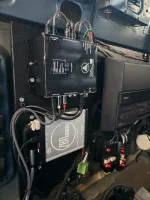
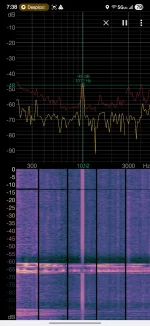
Finished the nav TV install. Can say no ping or tone. Also, the noise floor is better. NAV sends a cleaner and I think stronger signal with less noise. The PAC not only had a noticable higher noise floor, but also sent a 1khz signal regardless of volume and even when muted. (see attached spectrum). The nav is super clean. No noticable noise, very clean signal and no errant tones. The NAV may not send tones like the PAC does because it seems to delay power up on the equipment for about 4 seconds longer than the PAC did. Not sure if this is why or not, but regardless, the NAV is a clear winner in my book. Works as it should.
 

Attachments

  • 20250717_162349.webp
    20250717_162349.webp
    157.7 KB · Views: 91
  • Screenshot_20250709_073840_Spectroid.webp
    Screenshot_20250709_073840_Spectroid.webp
    125.6 KB · Views: 91
I've added a DSP and connected to the pac via toslink to see if the tone was present over optical. The tone persisted over optical. However, the tone was much lower db, it was quieter when getting audio via optical. Actually the DSP connection via optical made the tone somewhat tolerable.

So, thinking about work arounds, I created a delay circuit on the sense line to delay the sense signal 5 seconds. So now, the pac sends the remote power on sense signal to turn on the amp, which I delay 5 seconds, and then pass it to turn on the amp. I no longer hear the tone since the amp isn't yet on when the PAC sends the tone. This has been working very well, no adverse consequences observed. Doing it this way, I don't need the dsp or optical connection because the amp just isn't powered on until after the tone. Easy Arduino project if anyone is interested.

However, I'm not done fully troubleshooting yet. I ordered a NAV TV audio interface and will try it in place of the PAC. My plan is to simply remove the PAC, connect the NAV to the DSP via the toslink cable, and see if the tone persists. They delayed shipping for a while. But they say should be shipped today.

I'll post that result once I get it.
Thank you for the update. I'm curious to see if the Nav TV interface will have the same issues.
How did you go about creating that delay circuit?
Also, have you lost audio at anytime? It's happened to me, but I disconnected the battery and sound started working. .
 

Thank you for the update. I'm curious to see if the Nav TV interface will have the same issues.
How did you go about creating that delay circuit?
Also, have you lost audio at anytime? It's happened to me, but I disconnected the battery and sound started working. .
Yep, see above. Finished the Zen module install and it works as expected. No tone. Great sound. In my truck, it fixed the issue. Install instructions were a bit off compared to the harness that was sent but I got it figured out and the nav TV guys support is awesome. They answer the phone and actually will talk to you to help.

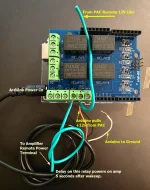
I can post the Arduino parts I used and the code snippet I wrote. I'll do that later. Basically I got a relay board for an Arduino and then wrote some code that would turn on the relay 5 seconds after the Arduino powered up. I connected the remote power line from the PAC to the power on the Arduino and also to the relay. Then connected the other side of the relay to the amplifier. Arduino powered up from the PAC and then the Arduino sent the remote signal 5 seconds later to the amp. Entirely worked around the tone for me. I only ever got the tone when the PAC woke up from standby so this was a perfect fix. I just wanted to try the nav to see if the problem persisted. TBH, the cost of the Arduino stuff was like $50 and the nav TV was $700. I can't say it's worth it to buy the nav when a $50 fix could work. But curiosity got me so I had to find out if the nav would do the same thing.
 

Thank you for the update. I'm curious to see if the Nav TV interface will have the same issues.
How did you go about creating that delay circuit?
Also, have you lost audio at anytime? It's happened to me, but I disconnected the battery and sound started working. .
Oh and no, I've never lost audio. My PAC was only a month old or so so I haven't lived with it for very long though.
 

Yep, see above. Finished the Zen module install and it works as expected. No tone. Great sound. In my truck, it fixed the issue. Install instructions were a bit off compared to the harness that was sent but I got it figured out and the nav TV guys support is awesome. They answer the phone and actually will talk to you to help.

I can post the Arduino parts I used and the code snippet I wrote. I'll do that later. Basically I got a relay board for an Arduino and then wrote some code that would turn on the relay 5 seconds after the Arduino powered up. I connected the remote power line from the PAC to the power on the Arduino and also to the relay. Then connected the other side of the relay to the amplifier. Arduino powered up from the PAC and then the Arduino sent the remote signal 5 seconds later to the amp. Entirely worked around the tone for me. I only ever got the tone when the PAC woke up from standby so this was a perfect fix. I just wanted to try the nav to see if the problem persisted. TBH, the cost of the Arduino stuff was like $50 and the nav TV was $700. I can't say it's worth it to buy the nav when a $50 fix could work. But curiosity got me so I had to find out if the nav would do the same thing.
Time delay/Inching circuits are cheaper and easy to setup
 

Arduino: https://a.co/d/cB047VA
Relay Shield: https://a.co/d/2E7bwll

Connected it like the below picture. It was powered entirely from the 12V signal line from the PAC. Then wrote this little snippet of code to turn the 1st relay on after 5 seconds.

Worked like a champ.

const int relayPin1 = 4; // Relay 1 connected to digital pin 4
const int relayPin2 = 5; // Relay 2 connected to digital pin 5
const int relayPin3 = 6; // Relay 3 connected to digital pin 6
const int relayPin4 = 7; // Relay 4 connected to digital pin 7

void setup() {
pinMode(relayPin1, OUTPUT); // Set relay 1 pin as output
pinMode(relayPin2, OUTPUT); // Set relay 2 pin as output
pinMode(relayPin3, OUTPUT); // Set relay 3 pin as output
pinMode(relayPin4, OUTPUT); // Set relay 4 pin as output
digitalWrite(relayPin1, LOW); // Ensure relay 1 is off
digitalWrite(relayPin2, LOW); // Ensure relay 2 is off
digitalWrite(relayPin3, LOW); // Ensure relay 3 is off
digitalWrite(relayPin4, LOW); // Ensure relay 4 is off
delay(5000); // Wait 5 seconds
digitalWrite(relayPin1, HIGH); // Turn relay 1 on
//delay(1000); // Wait 1 seconds
//digitalWrite(relayPin2, HIGH); // Turn relay 2 on
//delay(3000); // Wait 3 seconds
//digitalWrite(relayPin3, HIGH); // Turn relay 3 on
//delay(3000); // Wait 3 seconds
//digitalWrite(relayPin4, HIGH); // Turn relay 4 on
}

void loop()
{

}
 

Attachments

  • arduino.webp
    arduino.webp
    180.8 KB · Views: 57
Arduino: https://a.co/d/cB047VA
Relay Shield: https://a.co/d/2E7bwll

Connected it like the below picture. It was powered entirely from the 12V signal line from the PAC. Then wrote this little snippet of code to turn the 1st relay on after 5 seconds.

Worked like a champ.

const int relayPin1 = 4; // Relay 1 connected to digital pin 4
const int relayPin2 = 5; // Relay 2 connected to digital pin 5
const int relayPin3 = 6; // Relay 3 connected to digital pin 6
const int relayPin4 = 7; // Relay 4 connected to digital pin 7

void setup() {
pinMode(relayPin1, OUTPUT); // Set relay 1 pin as output
pinMode(relayPin2, OUTPUT); // Set relay 2 pin as output
pinMode(relayPin3, OUTPUT); // Set relay 3 pin as output
pinMode(relayPin4, OUTPUT); // Set relay 4 pin as output
digitalWrite(relayPin1, LOW); // Ensure relay 1 is off
digitalWrite(relayPin2, LOW); // Ensure relay 2 is off
digitalWrite(relayPin3, LOW); // Ensure relay 3 is off
digitalWrite(relayPin4, LOW); // Ensure relay 4 is off
delay(5000); // Wait 5 seconds
digitalWrite(relayPin1, HIGH); // Turn relay 1 on
//delay(1000); // Wait 1 seconds
//digitalWrite(relayPin2, HIGH); // Turn relay 2 on
//delay(3000); // Wait 3 seconds
//digitalWrite(relayPin3, HIGH); // Turn relay 3 on
//delay(3000); // Wait 3 seconds
//digitalWrite(relayPin4, HIGH); // Turn relay 4 on
}

void loop()
{

}
Incredible job. I will be purchasing the NavTV. An audio shop will be doing the install. When you mentioned "Install instructions were a bit off compared to the harness that was sent but I got it figured out", should I pass anything along to the shop?
I've always wondered what caused that ping on our trucks, and not everyone's. There's must be something more to this odd tone!
 

Incredible job. I will be purchasing the NavTV. An audio shop will be doing the install. When you mentioned "Install instructions were a bit off compared to the harness that was sent but I got it figured out", should I pass anything along to the shop?
I've always wondered what caused that ping on our trucks, and not everyone's. There's must be something more to this odd tone!
Sorry just checking this.

Yea, couple things. The noise floor is so low on the nav, you will hear alternator whine if you use the factory harness as they send it. This is what's weird. They recommended connecting directly to the same battery lines your amp is using for power. Even documented that way in the nav install docs. But the harness does not have those connections. It gets power directly from the harness pins. Which is fine. Works. BUT, I have noticed that I hear alternator whine and it's because I'm getting power from the harness. I called their support and they reiterated that they want direct battery power, and said to cut those harness wires and directly tap them to the amplifier power. Seems like they should have provided a harness with those pigtails already hanging off so I would not have to chop up the brand new harness to connect it properly. But I digress, probably best to cut and patch the black and red wires to your battery feed.

The harness comes pre wired to connect to all generations of Bose systems. Which is confusing. It has 4 harness connectors, but only 2 are used in operation. I used the CAN labeled harness and left all dip switches off (or on I dont remember) and it worked. I cut off the other harness ends that weren't used to minimize clutter. Depending on which amp you have changing dip #1 and using the brown instead of black can harness may be needed.

Also, the pigtails they do include from the harness are speaker wires for the front left and right and rear right and left. Those need to be connected to your existing amp connection to those speakers. They are unlabeled, but easy to cross reference by looking at the pin out of the existing speakers to the harness. The wire colors should be similar.

Also the way you configure the nav is not documented well. You can't configure it until it is powered on and connected to the var CAN bus. Only then will it allow configuration. You have to install a USB driver (very generic one) onto your laptop first. Then you connect the NAV TV to the car. Then it will give you a green LED. Or green and red combined. THEN you can connect your PC to the USB port and browse in your browser to zen/ and you'll get a configuration menu.

Very little to configure, id say it's actually pretty unecessary to configure at all. But I went in and boosted the signal from 0db to +6. Or maybe+3. Whatever the first incremental setting was. This sends an incredibly strong and clean signal to my DSP. I attenuate in the DSP the signal down -24db for my speakers. Less so for the sub though. This gives so much signal to equalize against. It's really hard not to have the system too loud at low volume. Whatever you do, Just make sure your amp gains are as low as they can be when using the nav. The signal is great and the amp doesn't need any more gain than necessary.

Oh I use the optical connection to my DSP. But the analog connection are arguably better since the dac in the NAV TV has better specs than the dac in my jlaudio twk 88. I just wanted to minimize wiring.
 

Oh and double check your chime volume before you button everything back up. It is easy to make it too low or high when adjusting gains. That is the one setting on the nav TV that I wish was just a knob on the panel. I've had to change that as I've changed db levels tuning it over time.
 

Finished the nav TV install. Can say no ping or tone. Also, the noise floor is better. NAV sends a cleaner and I think stronger signal with less noise. The PAC not only had a noticable higher noise floor, but also sent a 1khz signal regardless of volume and even when muted. (see attached spectrum). The nav is super clean. No noticable noise, very clean signal and no errant tones. The NAV may not send tones like the PAC does because it seems to delay power up on the equipment for about 4 seconds longer than the PAC did. Not sure if this is why or not, but regardless, the NAV is a clear winner in my book. Works as it should.
I figured out that PING noise.

Go to MyGMC app- Profile > Settings > Notifications ( I had a location alert ON)

Also check your information apps- I turned off Map+ and Spotify.

Now the PING sound that showed up recently on my truck is Gone.
 

New Posts

Most reactions

Back
Top