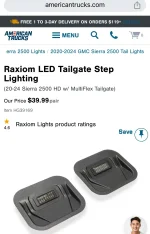
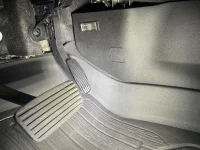
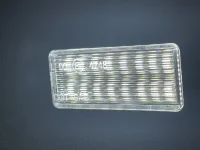
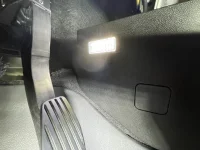
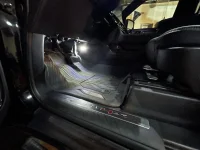
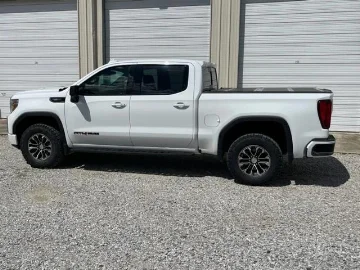
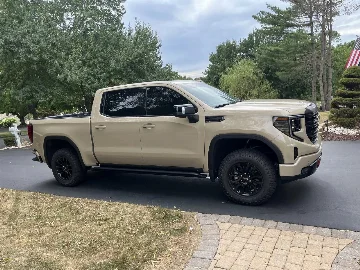
Added oem tailgate lights repurposed for footwell lights...

Did you take pictures of the connector?
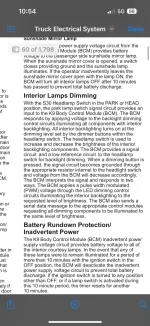
I found these pictures from another site.

Basically, all you have to do is just plug in the new wire into the blank? No need to actually tap into an existing wire?

View attachment 19781 View attachment 19779

Edit, nevermind, i see images and schematics posted here: https://www.at4forum.com/threads/interior-lighting-wire-to-tap.3345/post-32770
and here: https://www.at4forum.com/threads/2024-hd-electrical-schematic.3368/
xOperator - looks like the photos you included are a bit off in their labeling. Just don’t want anyone to be confused and mess up the wiring. You first photo has BCM X1 labeled on the far left. I show X1 on the far right, black plug all the way on the end. On the second photo it appears to show pin 7 as pin 1. With the plug flipped right side up with the retention tab at the top, the top right hole should be pin 1 used for lighted door sill plates or other devices controlled by dome light circuit. I believe your arrow is pointed to pin 7
 

Ok got it done. Ordered the GM molex connecter wire off eBay that plugs into BCM X1 plug pin #1 (very back black plug) which gives the dome light control 12v positive. Makes a big difference and works the same as the dome lights with door and switch. It also dims in and out as the dome lights.

-Wire needed for pin 1. GM OEM wire 19370262. https://www.ebay.com/itm/325878714390
-Lights I used. https://www.amazon.com/dp/B06XRR1J4G?ref=ppx_yo2ov_dt_b_fed_asin_title&th=1

Note: once the X1 plug is removed, use a small flat had screw driver to pull the whit side clip out about a 1/16 of and inch this will allow you to place the molex connector into the X1 plug. The push it back in after it installed. Also recommend removing the negative battery cable before starting this project.
All footwell lights parts are in. Now have to two projects lined up; footwell lights has to wait until after tailgate open alarm/indicator.
 

My wire came in today. Got my footwell lights installed.

Thanks to gemarsh - I copied your idea on the multipro step lights but integrated into 2024 wiring.

Total cost $40 step led lights (with wire harness which most Amazon step lights don’t include and are required for the lights) $37.50 OEM BCM wire.

Work perfect, dim and function with dome lights. Really good light output and OEM look.
 

Attachments

  • IMG_5693.webp
    IMG_5693.webp
    95.9 KB · Views: 254
  • IMG_5692.webp
    IMG_5692.webp
    47.5 KB · Views: 231
  • IMG_5718.webp
    IMG_5718.webp
    578.9 KB · Views: 242
  • IMG_5720.webp
    IMG_5720.webp
    94.1 KB · Views: 230
  • IMG_5721.webp
    IMG_5721.webp
    374.5 KB · Views: 241
  • IMG_5724.mov
    24.6 MB
  • IMG_5722.webp
    IMG_5722.webp
    259.9 KB · Views: 251
Just did this install on my 2025. Used X1 Pin 1. It will work with my doors and dome light button. But will not dim and brighten with screen and cluster lights. Any ideas as to why?
 

Just did this install on my 2025. Used X1 Pin 1. It will work with my doors and dome light button. But will not dim and brighten with screen and cluster lights. Any ideas as to why?
Using that pin should get the same programmed activation as the dome lights. So they fade in and out with door open and closed or button activation. I don’t believe the dome lights do anything or have any tie in to cluster or screen controls. If the dome lights are not on those should not be either.
 

Using that pin should get the same programmed activation as the dome lights. So they fade in and out with door open and closed or button activation. I don’t believe the dome lights do anything or have any tie in to cluster or screen controls. If the dome lights are not on those should not be either.
Thanks! I was watching the video you posted above and it seemed like the lights were dimming and staying on at the drivers side footwell. But looking closer it seems that was light from outside.
 

Thanks! I was watching the video you posted above and it seemed like the lights were dimming and staying on at the drivers side footwell. But looking closer it seems that was light from outside.
Yeah, that is correct. They mimic the dome lights exactly.

I have been thinking about doing a separate lighting project for light that is on all the time. Would tap in to the usb port circuit and put in a few dimmer LED’s, one in each footwell, and one in the cup holder area for low light while driving. Keeping that separate would work well.

Could do that with the footwell LED’s tied to the dome lights you installed too. You could do a 2 in 1 out diode and have the power from x1 pin 1 as one input, then power from the USB circuit on the other input, then the LED’s would activate with both. There may be overlap though when both usb and dome lamp signals are sent when door is open that that may override the dimming sequence though.

 

Yeah, that is correct. They mimic the dome lights exactly.

I have been thinking about doing a separate lighting project for light that is on all the time. Would tap in to the usb port circuit and put in a few dimmer LED’s, one in each footwell, and one in the cup holder area for low light while driving. Keeping that separate would work well.

Could do that with the footwell LED’s tied to the dome lights you installed too. You could do a 2 in 1 out diode and have the power from x1 pin 1 as one input, then power from the USB circuit on the other input, then the LED’s would activate with both. There may be overlap though when both usb and dome lamp signals are sent when door is open that that may override the dimming sequence though.
Yes that’s what I want to accomplish as well. The truck is so dark especially with window tint.

I want to find a way to tie the lights I installed into the same circuit that dims and brightens the cluster and screen. It seems this is triggered by the headlamp control to switch power to the backlighting circuit. Trying to figure out the wiring to tap to do this.
 

Attachments

  • IMG_5683.webp
    IMG_5683.webp
    190.8 KB · Views: 61
Yes that’s what I want to accomplish as well. The truck is so dark especially with window tint.

I want to find a way to tie the lights I installed into the same circuit that dims and brightens the cluster and screen. It seems this is triggered by the headlamp control to switch power to the backlighting circuit. Trying to figure out the wiring to tap to do this.
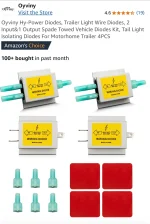
Message me your email if you want and I can e-mail you the full wiring schematic. Too large to attach here. It shows all BCM’s and you can find the pins out of BCM 9. You should be fine using the diode method and having both sources feed your LED’s. Only issue is if there is overlap where both circuits are on at the same time then it would just have the lights on and not sequential pattern. Only possible issue I see. I use these diodes to allow for multiple sources with no back feeding
 

Attachments

  • IMG_0243.webp
    IMG_0243.webp
    86.3 KB · Views: 71
Message me your email if you want and I can e-mail you the full wiring schematic. Too large to attach here. It shows all BCM’s and you can find the pins out of BCM 9. You should be fine using the diode method and having both sources feed your LED’s. Only issue is if there is overlap where both circuits are on at the same time then it would just have the lights on and not sequential pattern. Only possible issue I see. I use these diodes to allow for multiple sources with no back feeding
Thanks, that’s what I have been doing is using double diodes to isolate circuits. I’m going to look at these wiring diagrams. If I get this to work the way I want I will post an update.
 

I think I am finally going to get around to installing mine, I was having some neck issues so I couldn't get my head under the dash to find the right wire. Any tips on finding it on a 24 AT4 1500?
 

New Posts

Most reactions

Back
Top