I don't know if there's a way to stop it from happening without searching through the settings, but can you bring the maps back up while you're on the phone?
When I startup the truck, my XM channel is not playing, usually the 70's on 7. I change to the 60's on 6 and then back and the radio will play. Every so often, the XM channel will drop in and out momentarily. Some days, the infotainment center will do nothing for a few miles and then come to life.
I don't know if there's a way to stop it from happening without searching through the settings, but can you bring the maps back up while you're on the phone?
My map does not go away when I'm on the phone, it adds a banner to the bottom or the side of the screen that let's me know I am on a live call.
I did stumble across some multi-frame window settings a few weeks ago that offers options that has an affect on this very topic. If your screen is dedicated to a single frame, I would imagine that the maps will go away while on a call. If you have it setup for multi-frames, the map should stay up in a smaller window while on the call. I am in the office right now or I would offer more specifics. I will try to mess around with it again this evening and offer more information.
I don't know if there's a way to stop it from happening without searching through the settings, but can you bring the maps back up while you're on the phone?
It occurred to me that many others may be using maps from Apple Car Play or via a subscription. I am using maps via Android Auto, so I am not familiar with how the other options function.
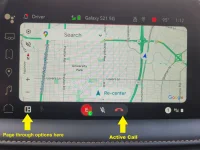
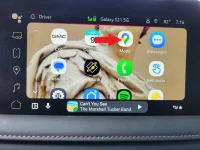
In Android Auto, if you page through the layout icon at the lower left of the screen (see image 1) you should eventually get to a screen full of icons (see image 2) Once at the icons page, click on the "Maps" icon and it should take you to a full screen map as depicted in Image 1. I roll with my screen like this at all times. When I am on a call, it only shows the active call graphics below the map.
In Image 1, I took that photo while on an active call. The three graphics at the bottom are the only things that come up on my screen during a call, and I still have full visual access to the current map. I hope this is helpful to someone.
Just today, the audio went out in the car. I couldn't hear the radio and the turn signal sound disappeared. I tried resetting the radio but for some reason it wouldn't reset. I turned the truck off and then back on and it was fine. I've had the truck 7 months and the only other time it did this was about 2 weeks after I bought it. Back then, brought it to the dealer and they disconnected the battery, waited a minute or so and then re-connected the battery which worked.
I cannot figure out how to play audio through USB port on an iPad
Any help in this matter would be greatly appreciated
I have googled this issue and really haven’t came up with anything
I do not want to use Bluetooth because of the quality downgrade
I use Amazon HD music. I’m not sure if the built-in app will play CD quality.
I cannot figure out how to play audio through USB port on an iPad
Any help in this matter would be greatly appreciated
I have googled this issue and really haven’t came up with anything
I do not want to use Bluetooth because of the quality downgrade
I use Amazon HD music. I’m not sure if the built-in app will play CD quality.
I cannot figure out how to play audio through USB port on an iPad
Any help in this matter would be greatly appreciated
I have googled this issue and really haven’t came up with anything
I do not want to use Bluetooth because of the quality downgrade
I use Amazon HD music. I’m not sure if the built-in app will play CD quality.
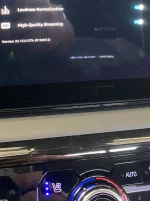
Found this today in settings of the built-inAmazon music app
I’m not sure if you can see the picture I added it, but there is a toggle for HD quality music
Sounds pretty good to my ears
Found this today in settings of the built-inAmazon music app
I’m not sure if you can see the picture I added it, but there is a toggle for HD quality music
Sounds pretty good to my ears
I've had Spotify for years even though they recently increased their fees for the Premium Individual plan I have, to $11.99 + tax, I continue to use their streaming services on my phone, truck and all Amazon Echo's in our home.
Just today, the audio went out in the car. I couldn't hear the radio and the turn signal sound disappeared. I tried resetting the radio but for some reason it wouldn't reset. I turned the truck off and then back on and it was fine. I've had the truck 7 months and the only other time it did this was about 2 weeks after I bought it. Back then, brought it to the dealer and they disconnected the battery, waited a minute or so and then re-connected the battery which worked.
last service i told my service writer about the drop in sirus and he had an update done-under warranty. been about a month with out any issue. KOW (knock on wood)
last service i told my service writer about the drop in sirus and he had an update done-under warranty. been about a month with out any issue. KOW (knock on wood)