How to Connect I phone to use ai phone Data

Ok yes my phone showed up on last page & i got it connected
Thanks for all the help
However it took at least 5 min for my phone finally showed up so I could enter the pw
Now to see if it will automatically connect next time in truck
I dont think it will
Im told to auto connect to my phone hotspot I will have to set up a shortcut / automation function on my phone to do that
That will be the next challenge if thats what to do
 

Will update
Does yours auto connect every time ?
I wonder why it takes so long to find my phone ?
 

UPDATE :
Phone hotspot working well it does take a minute or so to find my phone then I need to enter password
Thats a PIA

So
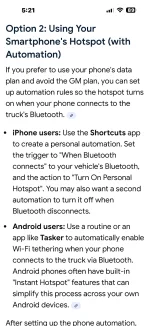
I set up an I Phone Shortcuts with Automation now it the Hotspot connects automatically when I start truck no need to enter a password etcetc I can switch from CarPlay to Goigle Maps or Google assistant Amazon Music etc etc seamlessly works great now using my Phone Data
Thanks for all the help
 

UPDATE :
Phone hotspot working well it does take a minute or so to find my phone then I need to enter password
Thats a PIA

So
I set up an I Phone Shortcuts with Automation now it the Hotspot connects automatically when I start truck no need to enter a password etcetc I can switch from CarPlay to Goigle Maps or Google assistant Amazon Music etc etc seamlessly works great now using my Phone Data
Thanks for all the help
Wonderful...Always pleased to see a Happy Ending :D
 

Wonderful...Always pleased to see a Happy Ending :D
Thanks again for reminding me how to find my phone LOL
STILL curious on your truck does it connect to phone Hotspot automatically or do you have to entrr PW each time

Or do you have a shortcut set up too
 

Thanks again for reminding me how to find my phone LOL
STILL curious on your truck does it connect to phone Hotspot automatically or do you have to entrr PW each time

Or do you have a shortcut set up too
I have a slightly different scenario but it functions similar to your phone hotpot. I may have mentioned, I briefly used iPhone hotspot for data while waiting for dashcam install (details in my signature). I use a dashcam with a cloud service connection, the dashcam has its own sim slot and sim card (part of my business phones/hi-speed unlimited data plan for US and Canada); the dashcam sim card-> Internet service also serves as a mobile hotspot. The truck automatically connects to the dashcam hotspot and uses its data for all GMC apps, plus it also helps connect wifi switches (my own design for fog lamps etc.) to the carplay screen.

Upon ignition switch on, the dashcam can take a minute or so to connect to the phone carrier via sim card, it then connects to the Blackview dashcam cloud (a service I also pay for) before it fully exposes its built in hotspot, then the truck connects to it. All this happens within the time I back out of our garage into our driveway. The dashcam remains switched on even while the truck is parked with ignition off and continues to record and monitor with its front and rear cameras; I can review recordings or live camera views from my iPhone. The dashcam has its own backup batteries since I choose not to drain truck dual batteries.
 

I know this string hasn’t had an entry in some time but I’m hoping someone can help me out. I have a 22 refresh and my Onstar data plan has just run out. I prefer the Google interface to CarPlay. I’ve tried to set up my IPhone as described here. My hotspot is on….i see several networks and phones when I scroll but not my own. Do done cell providers block tethering? I’ve even tried ‘add another network with my phone name and password and it still doesn’t work. Is there some trick? I guess if I can’t get it sorted I’ll defer to OnStar but I have a ton of data each month on my phone that never gets used….
 

Welcome.

When you say the Hotspot is turned on, is it? Do you have the "hotspot" included with your cell plan?

I can not help any further, as I'm Android.
 

If you have I phone & want to have your phone data run your truck built in aps like google maps
Then open the “shortcuts “ ap on yoyr phone set up auto connect / disconnect to use your hotspot
Every tome you start truck it will connect automatically no need gor GM data plan been using it for cpl yrs works great
Disconnects when you shut truck off
 

Welcome.

When you say the Hotspot is turned on, is it? Do you have the "hotspot" included with your cell plan?

I can not help any further, as I'm Android.
Thanks…hotspot is definitely part of my plan and turned on. I used it on other decided from time to time.
 

If you have I phone & want to have your phone data run your truck built in aps like google maps
Then open the “shortcuts “ ap on yoyr phone set up auto connect / disconnect to use your hotspot
Every tome you start truck it will connect automatically no need gor GM data plan been using it for cpl yrs works great
Disconnects when you shut truck off
Thanks…Sounds easy…any chance you can outline the steps ( or screenshots) to set up the shortcut. I tried using an example I found but I’m still unable to see my phone as an option so I’m definitely not doing it correctly!
 

You set up shortcut on the phone away from truck what your doing is setting up your phone Hotspot to turn on when truck starts

Not setting up the Truck Hotspot
 

Onviously you need bluetooth turned on on phone
Google instructions
 

Attachments

  • IMG_0977.webp
    IMG_0977.webp
    116.1 KB · Views: 39
Last edited:

New Posts

Most reactions

Back
Top