Android Auto Won't Connect via Wireless

Does your phone connect via android auto if you plug your phone in with a usb-c cable? If it connects, then it's probably a bluetooth issue. If it doesn't connect, then it's probably an android auto/Google issue.

I guess you could always try 'rebooting' your truck. Take the negative wire off the battery and leave it disconnected for about 10 minutes. Reconnect and see if the system reset helps.
I have to connect mine through cable bht the blue tooth connects fine. But android auto will not. Now get this when I stop at some locations in town it will connect and start right up no cable needed but when I go to leave the store it wont connect. Gm said they can't solve the issue and supposedly replaced the radio yet it continues to have this issue. They and I think that gm is deliberately trying tk make us subscribe to a subscription In order for Android auto to work. May or May not be true but I dont put anything past gm these days. Right now im in town sitting at wally world and android auto is working. Now when I go to leave it will not load up. Go figure. It's a hit and miss. But I am mad because I didnt by a 75 grand truck to have these issues. Dang if I do and dang if I dont.

Sorry for the long post.
 

I too had Wireless AA issues. My solution for now was to go into the settings on the truck and turn off "Fast Start up". It basically forces the infotainment system to reboot each time you start the truck. Takes maybe an extra 20-30 seconds to start up the infotainment system. However, if you remote start your truck (I do every time since I'm in the Phoenix area and it's hot as heck outside) it starts the boot process then. That has cleared up 99% of my connection issues.
X2
 

This is also an issue with wireless carplay. I bought my truck a month ago and my carplay connects maybe 10% of the time. I took in to the dealer last week and they said they updated the infotainment system but next day it was not connecting again. Only think that works for me is holding the hangup/mute button on steering wheel while in park to reboot the system.
 

I have been having the carplay connection issue since the last update. I changed the "fast start up" to off, and it connects most times. The last time it didn't connect, I went to the apps and carplay was not active. I tapped it and it went to the next screen where it showed my iphone was available. I tapped it and it connected. My truck just had another update on this past Sat. I haven't driven it since the update so I don't know if there are connection issues.
 

I have been having the carplay connection issue since the last update. I changed the "fast start up" to off, and it connects most times. The last time it didn't connect, I went to the apps and carplay was not active. I tapped it and it went to the next screen where it showed my iphone was available. I tapped it and it connected. My truck just had another update on this past Sat. I haven't driven it since the update so I don't know if there are connection issues.
Mine still will not connect unless I connect the cable to it. I had also changed the settings to fast connection but it had no effect. Sometimes if I dont connect the cable it might connect. It is a hit and miss connection. Yet I have noticed that they are pushing the onstar subscription service even for the gm app. Wonder if that is why I have connection issues because I dont have onstar
 

Having or not having Onstar should not be the reason you can't connect. I have the free Onstar that came with my truck, but no data plan. The infotainment s/w has to recognize your phone and connect it to AA or CP. And since it's s/w, it can get wonky if updates are not applied correctly. You can go through the process of rebooting the infotainment center, or go through the process of 'forgetting the truck' and re-pairing your phone to the truck when you are having connection issues. Or just use the cable. Next time you have it at the dealership, mention it to the service advisor to see if they know of an update or a fix.

For me, it's not a big deal as I only use CP to pull up Waze. I'm under warranty so if it really bothered me, I would be back at the dealership.
 

Having or not having Onstar should not be the reason you can't connect. I have the free Onstar that came with my truck, but no data plan. The infotainment s/w has to recognize your phone and connect it to AA or CP. And since it's s/w, it can get wonky if updates are not applied correctly. You can go through the process of rebooting the infotainment center, or go through the process of 'forgetting the truck' and re-pairing your phone to the truck when you are having connection issues. Or just use the cable. Next time you have it at the dealership, mention it to the service advisor to see if they know of an update or a fix.

For me, it's not a big deal as I only use CP to pull up Waze. I'm under warranty so if it really bothered me, I would be back at the dealership.
I have tried all.if thay and they replaced the radioand still nothing. It was not even working when I went to pick it up making me wonder if they even changed the radio out since they had informed me gm was not wanting to warranty it. it also still contained all my call logs from the previous radio but he said they backed it up then reinstalled the radio. Im no mechanic so I I really dont know. And the gm authority page is no help not the android auto. Im thinking about testing the theory of onstar and if it kicks in on the subscription 🤔 but for now while under warranty ill have to use the cable if I want to use maps and such then when the warranty is out look into an after market infotainment center.🤔

Thank you for the feed back
 

I have tried all.if thay and they replaced the radioand still nothing. It was not even working when I went to pick it up making me wonder if they even changed the radio out since they had informed me gm was not wanting to warranty it. it also still contained all my call logs from the previous radio but he said they backed it up then reinstalled the radio. Im no mechanic so I I really dont know. And the gm authority page is no help not the android auto. Im thinking about testing the theory of onstar and if it kicks in on the subscription 🤔 but for now while under warranty ill have to use the cable if I want to use maps and such then when the warranty is out look into an after market infotainment center.🤔

Thank you for the feed back
You don't need onstar for data to test; use your phone's hotspot (enable it) and setup your truck to use it. I did that initially until I installed my dash cam which has its own hotspot (uses a sim card).
 

I have had my 2026 AT4 for about 3 weeks now and it is a constant struggle to get the android auto to connect or consistently connect wirelessly to my phone. I have tried AI suggestions and gone about it more than a few different ways and I can get it to connect if I work at it, but it shouldn't have to be so hard. Sometimes it will connect on its own. I will take any suggestions and please forgive me if this as already been discussed. Thank you all.
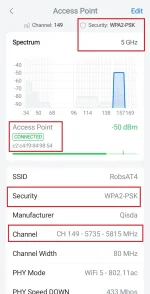
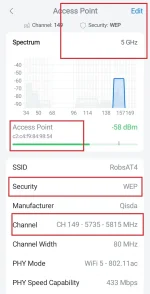
I found a problem with the Wi-Fi hotspot, which is required for wireless AA and ACP, that I'm very confident is related to these issues. For some reason the hotspot SSID is randomly being secured used WEP which is a very outdated, insecure technology that's not supported by modern devices. I've reported this to OnStar multiple times as both a functional problem and an equally important security issue. They refused to escalate, told me to bring it in for service and abruptly closed all tickets. As a side note, the default hotspot password from GM is too long to use with WEP so I can't think of a single reason why it would even try using it. Anyway, below is a link to screenshots from a wifi analyzer showing what I've explained here.

Link didn't work. Attaching pics
 

Attachments

  • ConnectedFullInfo.webp
    ConnectedFullInfo.webp
    44.2 KB · Views: 37
  • NotConnectedFullInfo.webp
    NotConnectedFullInfo.webp
    41.5 KB · Views: 22
I found a problem with the Wi-Fi hotspot, which is required for wireless AA and ACP, that I'm very confident is related to these issues. For some reason the hotspot SSID is randomly being secured used WEP which is a very outdated, insecure technology that's not supported by modern devices. I've reported this to OnStar multiple times as both a functional problem and an equally important security issue. They refused to escalate, told me to bring it in for service and abruptly closed all tickets. As a side note, the default hotspot password from GM is too long to use with WEP so I can't think of a single reason why it would even try using it. Anyway, below is a link to screenshots from a wifi analyzer showing what I've explained here.

Link didn't work. Attaching pics
This is interesting. My issue in my AT4 and CP seems to be related to BT. I don't connect to the truck's wifi b/c I didn't renew the data plan. I was having trouble connecting yesterday and the infotainment center kept saying it couldn't find my phone via BT.
 

This is interesting. My issue in my AT4 and CP seems to be related to BT. I don't connect to the truck's wifi b/c I didn't renew the data plan. I was having trouble connecting yesterday and the infotainment center kept saying it couldn't find my phone via BT.
Yeah, that sounds like a separate issue as my BT always connects. Just a note, wireless AA and CP always rely on the vehicle’s Wi-Fi module for high-bandwidth streaming, regardless of whether the car has an active cellular data plan. The connection sequence is...

• Bluetooth Handshake: Your phone connects to the infotainment system via Bluetooth.
• Credential Exchange: The car sends its Wi-Fi SSID and password to your phone over the BT link.
• Wi-Fi Handover: Your phone connects to the car's Wi-Fi network using those received credentials.
• Wireless Projection: The system switches data transfer entirely to high-bandwidth Wi-Fi to run CP or AA.

And because your phone retrieves the Wi-Fi credentials over BT during every startup, changing the vehicle's Wi-Fi SSID or password will not break your setup. I did both and it seamlessly reconnected without issue, well, at least that time without issue.
 

wireless AA and CP always rely on the vehicle’s Wi-Fi module for high-bandwidth streaming, regardless of whether the car has an active cellular data plan
That's interesting. Is this different than connecting your cell phone directly to the vehicle's wi-fi? If I connect my phone to my truck's wi-fi, and I don't have a truck data plan, my phone does not receive emails, maps, weather, etc. Are you saying that this is all behind the scenes phone and truck wi-fi connections that are separate from the obvious wi-fi connecting process? I'm just trying to understand all of this.
 

That's interesting. Is this different than connecting your cell phone directly to the vehicle's wi-fi? If I connect my phone to my truck's wi-fi, and I don't have a truck data plan, my phone does not receive emails, maps, weather, etc. Are you saying that this is all behind the scenes phone and truck wi-fi connections that are separate from the obvious wi-fi connecting process? I'm just trying to understand all of this.
The process I described is done automatically during the wireless AA connection. I too do not have a data plan and can do all of those things after AA successfully connects so it appears they may be different. Being a computer network engineer, I do have a theory as to how these connections could be different but will need to test it next time my connection fails. Will post what I find.

Also, another interesting twist. This morning AA didn't connect so I opened the wifi monitoring app I use (WiFiman by Ubiquiti Networks) while driving and saw that the wifi encryption method cycles at a fixed interval between WEP and WPA2-PSK (pre-shared key). And that the AA connection still fails when selecting the phone profile from the head unit, despite the app confirming valid encryption at that particular time.

Edited as original post was combined and duplicated.
 

Last edited:
You don't need onstar for data to test; use your phone's hotspot (enable it) and setup your truck to use it. I did that initially until I installed my dash cam which has its own hotspot (uses a sim card).
I tried that hooking it up to my Hotspot but I wouldn't connect. But
You don't need onstar for data to test; use your phone's hotspot (enable it) and setup your truck to use it. I did that initially until I installed my dash cam which has its own hotspot (uses a sim card).
I tried doing that before and I couldn't get it to connect for some reason but will try again. Here lately the android auto has been hit and miss. Sometimes it will connect ans sometimes it wont. Im thinking about getting a dash cam as well 🤔 still researching those at the moment. Sorry for late reply. And thank you
 

Most reactions

Back
Top